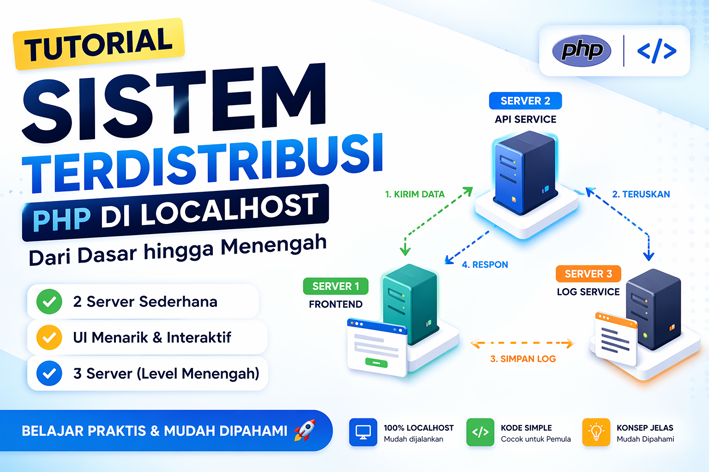
Sistem terdistribusi adalah konsep penting dalam dunia teknologi modern, di mana sebuah aplikasi tidak hanya berjalan di satu server, tetapi terbagi ke beberapa layanan yang saling berkomunikasi.
Dalam tutorial ini, kita akan belajar membuat sistem terdistribusi sederhana menggunakan PHP di localhost, mulai dari:
- level dasar (2 server)
- level UI sederhana
- hingga level menengah (3 server)
LEVEL 1 — PALING DASAR
Tujuan
Membuat komunikasi sederhana antara:
- Server 1 (frontend)
- Server 2 (API)
📁 Struktur Folder
distributed-local/
├── server1/
│ └── index.php
└── server2/
  └── api.php
💻 Server 2 (API sederhana)
<?php
header('Content-Type: application/json');

echo json_encode([
    "status" => "success",
    "message" => "Server 2 aktif"
]);
💻 Server 1 (teks biasa)
<?php
$response = file_get_contents("http://localhost:8001/api.php");
echo "<h1>Server 1</h1>";
echo "<pre>$response</pre>";
Cara Menjalankan
Terminal 1:
cd C:\xampp\htdocs\distributed-local

php -S localhost:8001 -t server2
Terminal 2:
cd C:\xampp\htdocs\distributed-localphp -S localhost:8000 -t server1✅ Hasil
Buka:
http://localhost:8000Akan muncul:
{
"status": "success",
"message": "Server 2 aktif"
}
Penjelasan
Server 1 memanggil Server 2 menggunakan HTTP.
Ini adalah bentuk paling sederhana dari sistem terdistribusi.
LEVEL 2 — TAMBAH INTERAKSI (FORM)
Tujuan
Mengirim data dari Server 1 ke Server 2
💻 Server 2
<?php
header('Content-Type: application/json');

$input = json_decode(file_get_contents("php://input"), true);

echo json_encode([
    "status" => "success",
    "data" => $input
]);
💻 Server 1
<?php
$response = null;

if ($_SERVER['REQUEST_METHOD'] === 'POST') {
    $data = json_encode([
        "nama" => $_POST['nama']
    ]);

    $options = [
        'http' => [
            'header' => "Content-Type: application/json",
            'method' => 'POST',
            'content' => $data
        ]
    ];

    $context = stream_context_create($options);
    $response = file_get_contents("http://localhost:8001/api.php", false, $context);
}
?>

<h1>Form Kirim Data</h1>

<form method="post">
    <input type="text" name="nama" placeholder="Nama">
    <button type="submit">Kirim</button>
</form>

<?php if ($response): ?>
<pre><?= $response ?></pre>
<?php endif; ?>
Hasil
- User input data
- Data dikirim ke server lain
- Server lain membalas
LEVEL 3 — TAMBAH DESAIN SEDERHANA
Tujuan
Membuat tampilan lebih menarik
💻 Server 1 (UI sederhana)
<style>
body {
  font-family: Arial;
  background: #f4f7fb;
}
.box {
  width: 400px;
  margin: 50px auto;
  background: white;
  padding: 20px;
  border-radius: 10px;
}
button {
  background: blue;
  color: white;
}
</style>

<div class="box">
<h2>Input Data</h2>

<form method="post">
<input type="text" name="nama" placeholder="Nama">
<button>Kirim</button>
</form>

<?php if ($response): ?>
<pre><?= $response ?></pre>
<?php endif; ?>

</div>
✅ Hasil
- tampilan lebih profesional
- lebih cocok untuk demo / praktikum
LEVEL 4 — MIDDLE (3 SERVER)
Tujuan
Menambahkan server ketiga sebagai log service
Struktur
distributed-local/
├── server1/
├── server2/
└── server3/
💻 Server 3 (log)
<?php
header('Content-Type: application/json');

$data = json_decode(file_get_contents("php://input"), true);

file_put_contents("log.txt", json_encode($data) . PHP_EOL, FILE_APPEND);

echo json_encode(["status" => "logged"]);
💻 Server 2 (API utama)
<?php
header('Content-Type: application/json');

$data = json_decode(file_get_contents("php://input"), true);

// kirim ke server 3
$options = [
  'http' => [
    'header' => "Content-Type: application/json",
    'method' => 'POST',
    'content' => json_encode($data)
  ]
];

$context = stream_context_create($options);
file_get_contents("http://localhost:8002/log.php", false, $context);

echo json_encode([
  "status" => "success",
  "data" => $data
]);
Jalankan
php -S localhost:8000 -t server1

php -S localhost:8001 -t server2

php -S localhost:8002 -t server3
✅ Hasil
Alur:
- Server 1 kirim data
- Server 2 menerima
- Server 2 kirim ke Server 3
- Server 3 menyimpan log
Kenapa ini disebut sistem terdistribusi?
Karena:
- ada banyak server
- tiap server punya tugas
- saling komunikasi lewat jaringan
Kesimpulan
Dengan PHP sederhana, kita sudah bisa membuat:
- komunikasi antar server
- API service
- logging system
- arsitektur distributed