Apa Itu Microservices?
Dalam dunia sistem terdistribusi modern, microservices menjadi pendekatan yang sangat populer untuk membangun aplikasi yang besar namun tetap fleksibel dan mudah dikembangkan.
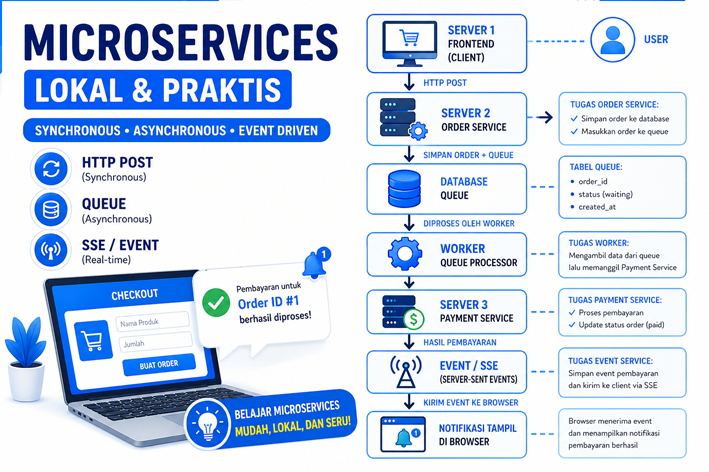
Microservices Architecture adalah konsep di mana sebuah aplikasi tidak lagi dibuat sebagai satu sistem besar (monolithic), tetapi dipecah menjadi beberapa layanan kecil (services) yang saling terhubung melalui jaringan.
Setiap service memiliki tugas spesifik dan dapat berjalan secara mandiri. Misalnya dalam sistem sederhana:
- Order Service → menangani pembuatan pesanan
- Payment Service → menangani pembayaran
- Notification Service → mengirim notifikasi ke user
Semua service ini saling berkomunikasi menggunakan API atau event, bukan berjalan dalam satu aplikasi besar.
Kenapa Microservices Penting?
Pendekatan ini digunakan karena memiliki beberapa keunggulan:
- Sistem lebih mudah dikembangkan (tidak tergantung satu aplikasi besar)
- Bisa diskalakan per bagian (misalnya hanya Payment Service yang ditingkatkan)
- Lebih tahan terhadap error (jika satu service mati, yang lain tetap jalan)
- Mendukung penggunaan teknologi yang berbeda di tiap service
Namun, microservices juga membawa tantangan seperti:
- Kompleksitas komunikasi antar service
- Pengelolaan data yang terpisah
- Debugging yang lebih sulit
Tujuan Praktikum
Pada praktikum ini, kita tidak langsung menggunakan teknologi kompleks seperti Docker atau Kubernetes. Sebaliknya, kita akan memahami konsep dasarnya terlebih dahulu melalui simulasi sederhana di lingkungan lokal.
Tujuan utama praktikum ini adalah:
- Memahami bagaimana microservices bekerja dalam sistem terdistribusi
- Mengimplementasikan komunikasi antar service dengan:
- HTTP POST (Synchronous)
- Queue (Asynchronous)
- SSE / Event (Real-time notification)
- Menjalankan beberapa service secara terpisah menggunakan port berbeda
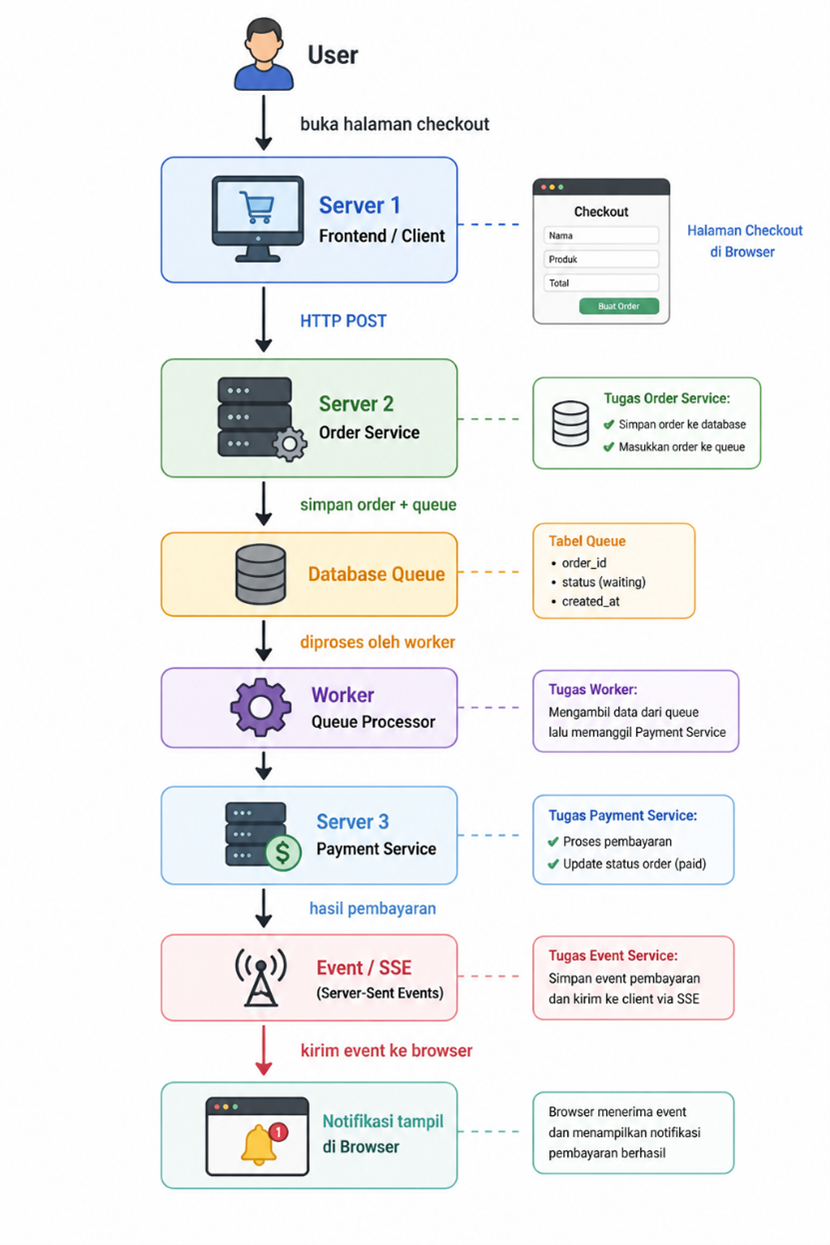
- Memahami alur data dari user → processing → notifikasi hasil
Studi Kasus
Kita akan membuat sistem sederhana bernama:
Mini E-Commerce Microservices
Sistem ini terdiri dari:
|
Komponen |
Fungsi |
Port |
|
Server 1 |
Frontend / Client |
localhost:8000 |
|
Server 2 |
Order Service |
localhost:8001 |
|
Server 3 |
Payment Service |
localhost:8002 |
|
Worker |
Memproses queue |
Terminal terpisah |
|
SSE |
Menampilkan notifikasi real-time |
localhost:8000/events.php |
Arsitektur Sistem
Konsep yang Dipelajari
A. HTTP POST — Synchronous
Client mengirim data ke Order Service dan langsung menunggu respon.
Contoh:
B. Queue — Asynchronous
Order Service tidak langsung memproses pembayaran, tetapi memasukkan data ke tabel queue.
Contoh:
C. SSE — Event-Driven
Browser menerima notifikasi otomatis ketika pembayaran berhasil diproses.
Contoh:
Persiapan Folder Project
Buat folder utama:
Di dalamnya buat struktur seperti ini:
distributed-microservices-local/
│
├── database/
│   └── microservices.sql
│
├── server1-client/
│   ├── index.php
│   ├── events.php
│   └── style.css
│
├── server2-order/
│   ├── db.php
│   └── order.php
│
├── server3-payment/
│   ├── db.php
│   └── payment.php
│
└── worker/
    ├── db.php
    └── queue_worker.php
Database MySQL
Buka phpMyAdmin, lalu buat database:
Kemudian jalankan SQL berikut.
File: database/microservices.sql
CREATE DATABASE IF NOT EXISTS microservices_demo;
USE microservices_demo;

CREATE TABLE orders (
    id INT AUTO_INCREMENT PRIMARY KEY,
    customer_name VARCHAR(100) NOT NULL,
    product_name VARCHAR(100) NOT NULL,
    amount INT NOT NULL,
    status VARCHAR(30) DEFAULT 'pending',
    created_at TIMESTAMP DEFAULT CURRENT_TIMESTAMP
);

CREATE TABLE payment_queue (
    id INT AUTO_INCREMENT PRIMARY KEY,
    order_id INT NOT NULL,
    status VARCHAR(30) DEFAULT 'waiting',
    created_at TIMESTAMP DEFAULT CURRENT_TIMESTAMP,
    processed_at DATETIME NULL
);

CREATE TABLE events (
    id INT AUTO_INCREMENT PRIMARY KEY,
    message TEXT NOT NULL,
    created_at TIMESTAMP DEFAULT CURRENT_TIMESTAMP
);
Server 1 — Frontend / Client
Server ini berfungsi sebagai halaman utama mahasiswa untuk melakukan checkout.
File: server1-client/index.php
<!DOCTYPE html>
<html lang="id">
<head>
    <meta charset="UTF-8">
    <title>Mini Microservices E-Commerce</title>
    <link rel="stylesheet" href="style.css">
</head>
<body>

<div class="container">
    <h1>Mini E-Commerce Microservices</h1>
    <p class="subtitle">
        Praktikum Sistem Terdistribusi: HTTP POST, Queue, dan Event SSE
    </p>

    <div class="card">
        <h2>Form Checkout</h2>

        <form id="orderForm">
            <label>Nama Customer</label>
            <input type="text" name="customer_name" required placeholder="Contoh: Andi">

            <label>Nama Produk</label>
            <input type="text" name="product_name" required placeholder="Contoh: Buku IoT">

            <label>Total Pembayaran</label>
            <input type="number" name="amount" required placeholder="Contoh: 50000">

            <button type="submit">Buat Order</button>
        </form>

        <div id="responseBox" class="response"></div>
    </div>

    <div class="card">
        <h2>Notifikasi Event</h2>
        <div id="eventBox" class="event-box">
            Menunggu event dari server...
        </div>
    </div>
</div>

<script>
document.getElementById('orderForm').addEventListener('submit', async function(e) {
    e.preventDefault();

    const formData = new FormData(this);

    const response = await fetch('http://localhost:8001/order.php', {
        method: 'POST',
        body: formData
    });

    const result = await response.json();

    document.getElementById('responseBox').innerHTML = `
        <strong>Status:</strong> ${result.status}<br>
        <strong>Pesan:</strong> ${result.message}<br>
        <strong>Order ID:</strong> ${result.order_id}
    `;
});

const eventSource = new EventSource('events.php');

eventSource.onmessage = function(event) {
    document.getElementById('eventBox').innerHTML = event.data;
};
</script>

</body>
</html>
File: server1-client/events.php
<?php
header('Content-Type: text/event-stream');
header('Cache-Control: no-cache');
header('Connection: keep-alive');

$pdo = new PDO("mysql:host=localhost;dbname=microservices_demo", "root", "");

while (true) {
    $stmt = $pdo->query("SELECT * FROM events ORDER BY id DESC LIMIT 1");
    $event = $stmt->fetch(PDO::FETCH_ASSOC);

    if ($event) {
        echo "data: " . $event['message'] . "\n\n";
        ob_flush();
        flush();
    }

    sleep(2);
}
File: server1-client/style.css
body {
    font-family: Arial, sans-serif;
    background: #f4f7fb;
    margin: 0;
    padding: 0;
    color: #1f2937;
}

.container {
    max-width: 850px;
    margin: 40px auto;
    padding: 20px;
}

h1 {
    text-align: center;
    color: #0f4c81;
}

.subtitle {
    text-align: center;
    color: #64748b;
    margin-bottom: 30px;
}

.card {
    background: #ffffff;
    padding: 25px;
    margin-bottom: 25px;
    border-radius: 16px;
    box-shadow: 0 10px 30px rgba(15, 76, 129, 0.08);
}

label {
    display: block;
    margin-top: 15px;
    font-weight: bold;
}

input {
    width: 100%;
    padding: 12px;
    margin-top: 6px;
    border: 1px solid #dbe3ef;
    border-radius: 10px;
    box-sizing: border-box;
}

button {
    margin-top: 20px;
    background: #0f4c81;
    color: white;
    border: none;
    padding: 13px 20px;
    border-radius: 10px;
    cursor: pointer;
    font-weight: bold;
}

button:hover {
    background: #0b3a63;
}

.response {
    margin-top: 20px;
    padding: 15px;
    background: #eef6ff;
    border-left: 5px solid #0f4c81;
    border-radius: 10px;
}

.event-box {
    padding: 15px;
    background: #fff7e6;
    border-left: 5px solid #d4a017;
    border-radius: 10px;
}
Server 2 — Order Service
Server ini menerima order dari frontend, menyimpan data order, lalu memasukkan order ke queue pembayaran.
File: server2-order/db.php
<?php
$pdo = new PDO("mysql:host=localhost;dbname=microservices_demo", "root", "");
$pdo->setAttribute(PDO::ATTR_ERRMODE, PDO::ERRMODE_EXCEPTION);
File: server2-order/order.php
<?php
header("Access-Control-Allow-Origin: *");
header("Content-Type: application/json");

require_once "db.php";

if ($_SERVER['REQUEST_METHOD'] !== 'POST') {
    echo json_encode([
        "status" => "error",
        "message" => "Gunakan method POST"
    ]);
    exit;
}

$customerName = $_POST['customer_name'] ?? '';
$productName  = $_POST['product_name'] ?? '';
$amount       = $_POST['amount'] ?? 0;

if ($customerName == '' || $productName == '' || $amount <= 0) {
    echo json_encode([
        "status" => "error",
        "message" => "Data tidak lengkap"
    ]);
    exit;
}

$stmt = $pdo->prepare("
    INSERT INTO orders (customer_name, product_name, amount, status)
    VALUES (?, ?, ?, 'pending')
");
$stmt->execute([$customerName, $productName, $amount]);

$orderId = $pdo->lastInsertId();

$stmtQueue = $pdo->prepare("
    INSERT INTO payment_queue (order_id, status)
    VALUES (?, 'waiting')
");
$stmtQueue->execute([$orderId]);

echo json_encode([
    "status" => "success",
    "message" => "Order berhasil dibuat dan masuk ke queue pembayaran",
    "order_id" => $orderId
]);
Server 3 — Payment Service
Server ini akan dipanggil oleh worker untuk memproses pembayaran.
File: server3-payment/db.php
<?php
$pdo = new PDO("mysql:host=localhost;dbname=microservices_demo", "root", "");
$pdo->setAttribute(PDO::ATTR_ERRMODE, PDO::ERRMODE_EXCEPTION);
File: server3-payment/payment.php
<?php
header("Content-Type: application/json");

require_once "db.php";

$orderId = $_POST['order_id'] ?? 0;

if ($orderId <= 0) {
    echo json_encode([
        "status" => "error",
        "message" => "Order ID tidak valid"
    ]);
    exit;
}

sleep(2);

$stmt = $pdo->prepare("
    UPDATE orders
    SET status = 'paid'
    WHERE id = ?
");
$stmt->execute([$orderId]);

$stmtEvent = $pdo->prepare("
    INSERT INTO events (message)
    VALUES (?)
");

$message = "Pembayaran untuk Order ID #{$orderId} berhasil diproses oleh Payment Service.";
$stmtEvent->execute([$message]);

echo json_encode([
    "status" => "success",
    "message" => "Pembayaran berhasil",
    "order_id" => $orderId
]);
Worker — Queue Processor
Worker membaca queue pembayaran, lalu memanggil Payment Service.
File: worker/db.php
<?php
$pdo = new PDO("mysql:host=localhost;dbname=microservices_demo", "root", "");
$pdo->setAttribute(PDO::ATTR_ERRMODE, PDO::ERRMODE_EXCEPTION);
File: worker/queue_worker.php
<?php
require_once "db.php";

echo "Queue Worker berjalan...\n";

while (true) {
    $stmt = $pdo->query("
        SELECT * FROM payment_queue
        WHERE status = 'waiting'
        ORDER BY id ASC
        LIMIT 1
    ");

    $queue = $stmt->fetch(PDO::FETCH_ASSOC);

    if ($queue) {
        $queueId = $queue['id'];
        $orderId = $queue['order_id'];

        echo "Memproses Queue ID: {$queueId}, Order ID: {$orderId}\n";

        $ch = curl_init("http://localhost:8002/payment.php");
        curl_setopt($ch, CURLOPT_POST, true);
        curl_setopt($ch, CURLOPT_POSTFIELDS, [
            "order_id" => $orderId
        ]);
        curl_setopt($ch, CURLOPT_RETURNTRANSFER, true);

        $response = curl_exec($ch);
        curl_close($ch);

        echo "Respon Payment Service: {$response}\n";

        $update = $pdo->prepare("
            UPDATE payment_queue
            SET status = 'processed', processed_at = NOW()
            WHERE id = ?
        ");
        $update->execute([$queueId]);
    } else {
        echo "Tidak ada queue baru...\n";
    }

    sleep(3);
}
Cara Menjalankan Praktikum
Buka 4 terminal.
Terminal 1 — Jalankan Server 1
Terminal 2 — Jalankan Server 2
php -S localhost:8001
Terminal 3 — Jalankan Server 3
php -S localhost:8002
Terminal 4 — Jalankan Worker
php queue_worker.php
Cara Menguji Sistem
Buka browser:
Isi form:
Nama Produk: Buku IoT
Total Pembayaran: 50000
Klik:
Hasil yang Diharapkan
Di halaman browser:
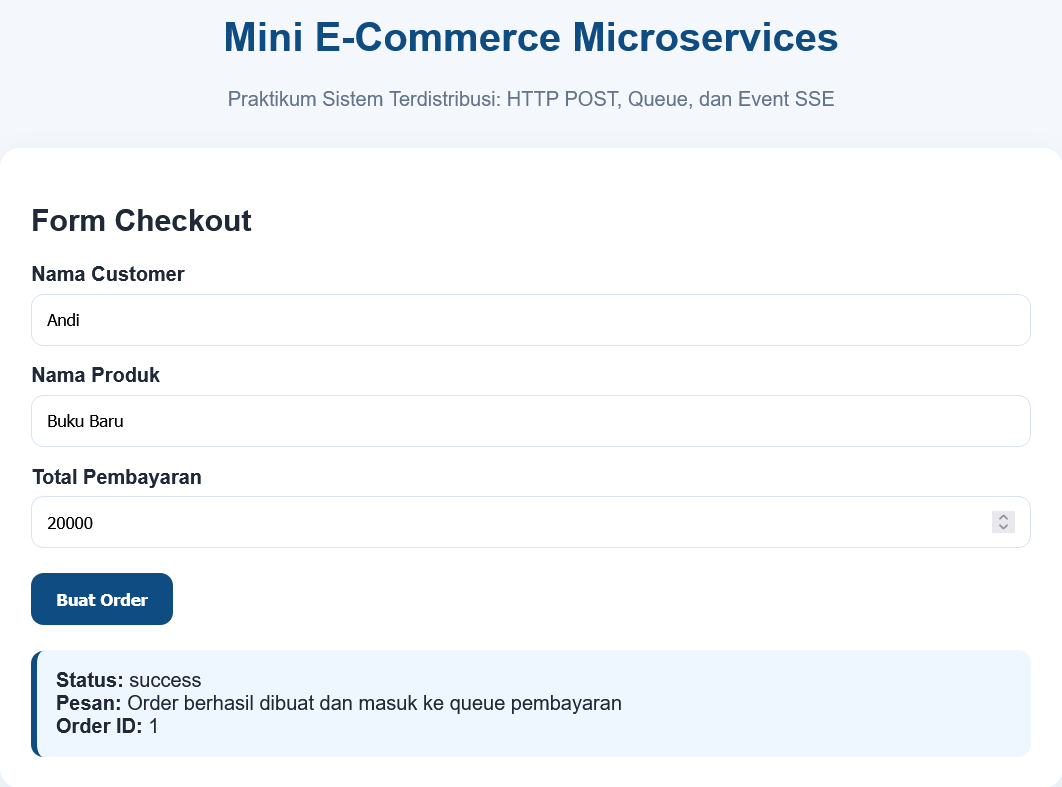
Order berhasil dibuat dan masuk ke queue pembayaran
Beberapa detik kemudian muncul notifikasi:
Di terminal worker:
Penjelasan Alur Sistem
Langkah 1
Mahasiswa membuka halaman frontend:
Frontend ini berperan sebagai Client.
Langkah 2
Frontend mengirim data order ke Order Service:
Ini adalah komunikasi synchronous karena client menunggu respon langsung.
Langkah 3
Order Service menyimpan data ke tabel:
Lalu memasukkan data ke tabel:
Ini adalah konsep asynchronous processing.
Langkah 4
Worker membaca data dari tabel queue.
Jika ada order baru, worker akan memanggil:
Langkah 5
Payment Service mengubah status order menjadi:
Lalu membuat event baru di tabel:
Langkah 6
Frontend membaca event melalui SSE.
Jika ada event baru, notifikasi tampil otomatis di browser.

Hubungan dengan Microservices
Praktikum ini menunjukkan konsep microservices karena:
|
Konsep |
Implementasi Praktikum |
|
Service terpisah |
Client, Order, Payment |
|
Port berbeda |
8000, 8001, 8002 |
|
Komunikasi API |
HTTP POST |
|
Queue |
Tabel payment_queue |
|
Event-driven |
SSE melalui events.php |
|
Independent service |
Setiap service bisa dijalankan sendiri |
Tugas Mahasiswa
Tugas 1
Tambahkan kolom baru pada tabel orders:
quantity INT
Lalu ubah form checkout agar user bisa memasukkan jumlah produk.
Tugas 2
Tambahkan status order:
pending
processing
paid
failed
Tugas 3
Buat halaman baru untuk menampilkan daftar order.
Contoh:
localhost:8000/orders.php
Tugas 4
Buat simulasi pembayaran gagal jika total pembayaran kurang dari Rp10.000.
Tugas 5
Tambahkan tampilan log event agar semua event tampil, bukan hanya event terakhir.
Kesimpulan Praktikum
Praktikum ini membuktikan bahwa konsep microservices tidak harus langsung menggunakan teknologi kompleks seperti Docker, Kubernetes, RabbitMQ, atau Kafka.
Dengan PHP Native, MySQL, beberapa port lokal, queue sederhana, dan SSE, mahasiswa sudah dapat memahami konsep utama sistem terdistribusi:
- Client-server
- Service terpisah
- HTTP API
- Queue
- Worker
- Event-driven notification
Praktikum ini cocok sebagai tahap awal sebelum masuk ke microservices yang lebih modern menggunakan Laravel, Node.js, Docker, Redis, RabbitMQ, atau Kubernetes.