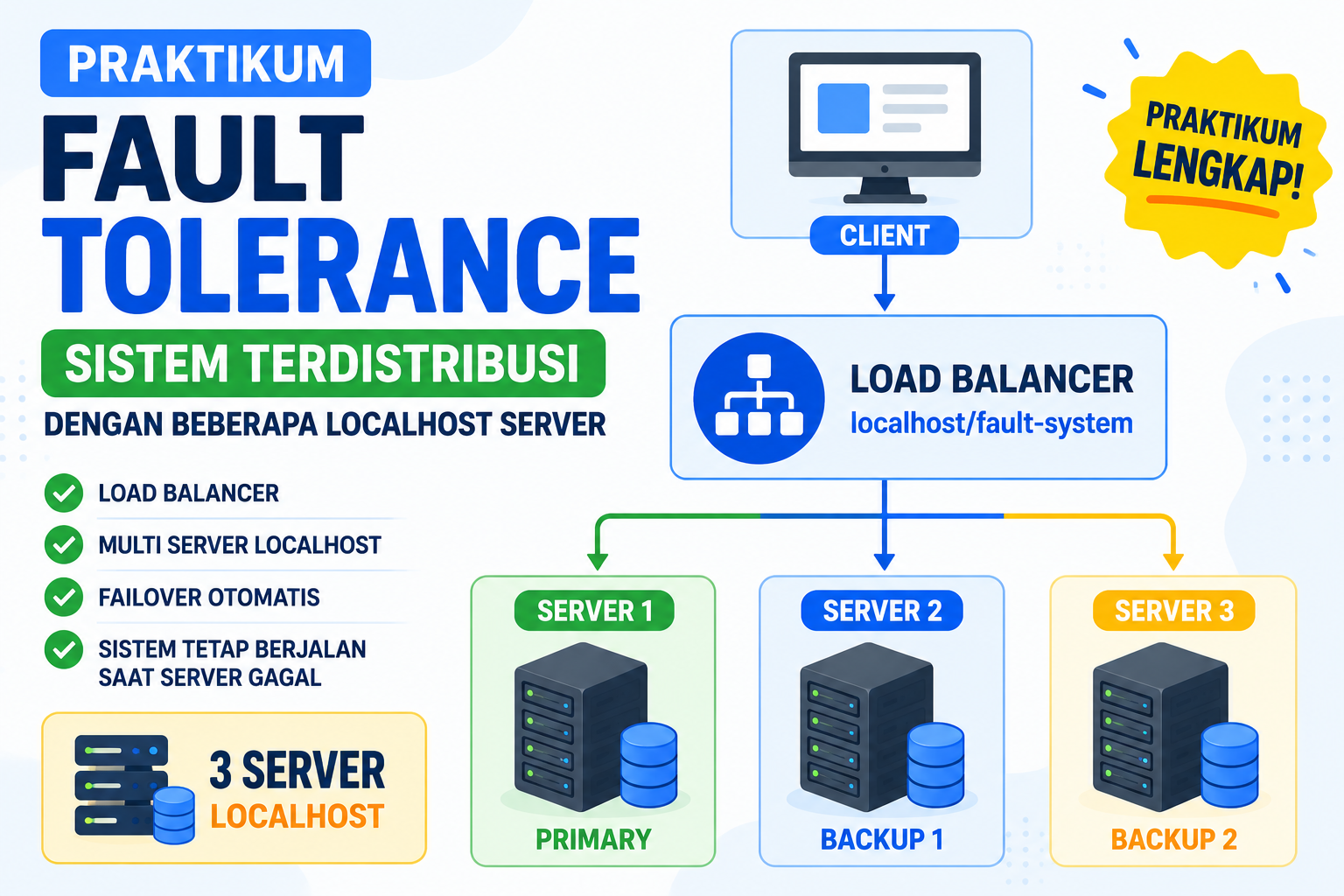
Pada praktikum ini, Anda akan membangun simulasi sederhana sistem terdistribusi yang menerapkan konsep fault tolerance menggunakan beberapa server localhost.
Sistem akan terdiri dari:
- satu client,
- satu load balancer,
- dan beberapa server backend.
Load balancer bertugas menerima request dari client, kemudian meneruskannya ke server yang tersedia dan masih aktif.
Arsitektur sistem yang akan dibuat dapat dilihat pada Gambar dibawah!
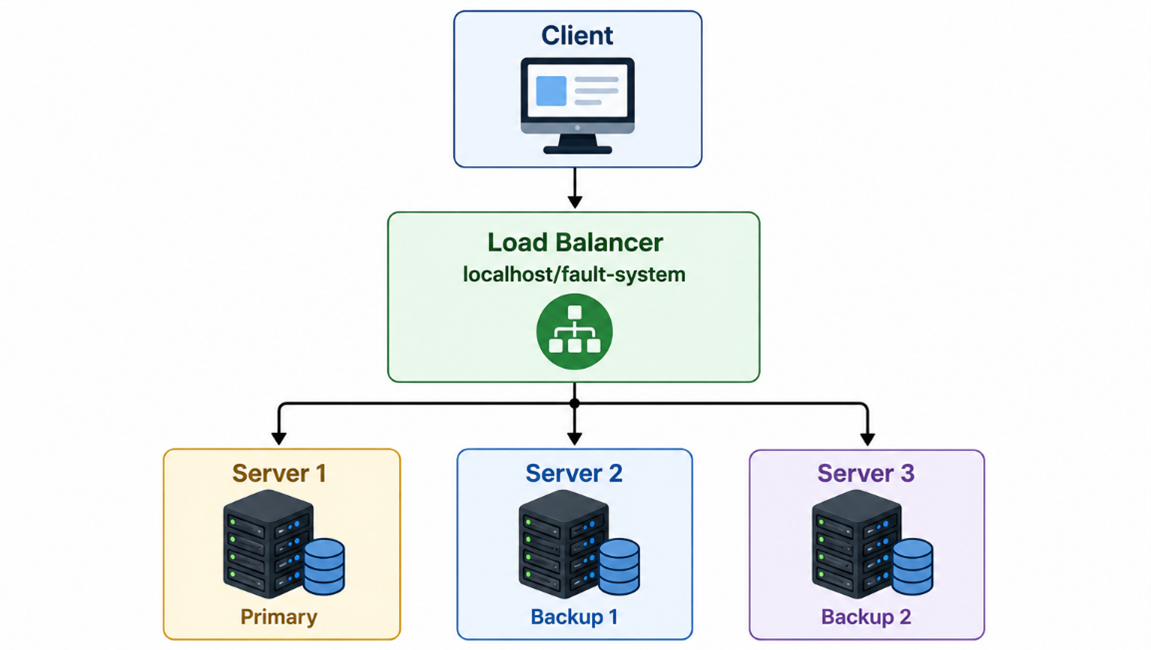
Dalam kondisi normal, request dari client akan diproses oleh server utama. Namun, apabila salah satu server mengalami gangguan atau berhenti berjalan, sistem akan secara otomatis menggunakan server lain yang masih aktif.
Dengan mekanisme ini, layanan tetap dapat berjalan tanpa menyebabkan sistem berhenti secara keseluruhan.
Melalui studi kasus ini, mahasiswa akan memahami bagaimana:
- sistem terdistribusi bekerja,
- load balancer mendistribusikan request,
- server backup digunakan,
- serta bagaimana fault tolerance menjaga ketersediaan layanan ketika terjadi kegagalan pada server utama.
Konsep Sistem
Sistem terdiri dari beberapa komponen:
|
Komponen |
Fungsi |
|
Client |
Mengakses aplikasi melalui browser |
|
Load Balancer |
Mengarahkan request ke server yang aktif |
|
Server 1 |
Server utama |
|
Server 2 |
Server cadangan pertama |
|
Server 3 |
Server cadangan kedua |
|
Log File |
Mencatat server yang digunakan |
Struktur Folder
Buat folder di:
Struktur folder:
fault-system/
├── index.php
├── log.txt
├── load-balancer/
│   └── index.php
├── server1/
│   └── index.php
├── server2/
│   └── index.php
└── server3/
    └── index.php
Membuat Server 1
Buat file:
Isi file:
<?php
header('Content-Type: application/json');

$response = [
    "server" => "Server 1",
    "role" => "Primary Server",
    "status" => "ACTIVE",
    "message" => "Request berhasil diproses oleh Server 1",
    "time" => date("Y-m-d H:i:s")
];

echo json_encode($response, JSON_PRETTY_PRINT);
?>
Membuat Server 2
Buat file:
Isi file:
<?php
header('Content-Type: application/json');

$response = [
    "server" => "Server 2",
    "role" => "Backup Server 1",
    "status" => "ACTIVE",
    "message" => "Request berhasil diproses oleh Server 2",
    "time" => date("Y-m-d H:i:s")
];

echo json_encode($response, JSON_PRETTY_PRINT);
?>
Membuat Server 3
Buat file:
Isi file:
<?php
header('Content-Type: application/json');

$response = [
    "server" => "Server 3",
    "role" => "Backup Server 2",
    "status" => "ACTIVE",
    "message" => "Request berhasil diproses oleh Server 3",
    "time" => date("Y-m-d H:i:s")
];

echo json_encode($response, JSON_PRETTY_PRINT);
?>
Membuat Load Balancer
Buat file:
Isi file:
<?php

$servers = [
    [
        "name" => "Server 1",
        "role" => "Primary Server",
        "url"  => "http://localhost/fault-system/server1/index.php"
    ],
    [
        "name" => "Server 2",
        "role" => "Backup Server 1",
        "url"  => "http://localhost/fault-system/server2/index.php"
    ],
    [
        "name" => "Server 3",
        "role" => "Backup Server 2",
        "url"  => "http://localhost/fault-system/server3/index.php"
    ]
];

function requestServer($url){
    $context = stream_context_create([
        'http' => [
            'timeout' => 2
        ]
    ]);

    $response = @file_get_contents($url, false, $context);

    if($response === false){
        return null;
    }

    return $response;
}

$activeServer = null;
$result = null;
$serverStatus = [];

foreach($servers as $server){
    $response = requestServer($server['url']);

    if($response !== null){
        $serverStatus[] = [
            "name" => $server['name'],
            "role" => $server['role'],
            "status" => "ONLINE"
        ];

        if($activeServer === null){
            $activeServer = $server;
            $result = $response;
        }

    }else{
        $serverStatus[] = [
            "name" => $server['name'],
            "role" => $server['role'],
            "status" => "OFFLINE"
        ];
    }
}

if($activeServer !== null){
    $log = date("Y-m-d H:i:s") .
           " | Active Server: " . $activeServer['name'] .
           " | Role: " . $activeServer['role'] . PHP_EOL;

    file_put_contents("../log.txt", $log, FILE_APPEND);
}else{
    $log = date("Y-m-d H:i:s") .
           " | Semua server offline" . PHP_EOL;

    file_put_contents("../log.txt", $log, FILE_APPEND);
}

?>
<!DOCTYPE html>
<html lang="id">
<head>
<meta charset="UTF-8">
<title>Fault Tolerance System</title>
<meta http-equiv="refresh" content="5">
<meta name="viewport" content="width=device-width, initial-scale=1.0">

<style>
*{
    box-sizing:border-box;
}

body{
    margin:0;
    font-family:Segoe UI, Arial, sans-serif;
    background:#f4f7fb;
    color:#1f2937;
    padding:30px;
}

.container{
    max-width:1100px;
    margin:auto;
}

.header{
    background:linear-gradient(135deg,#1d4ed8,#0f172a);
    color:white;
    padding:30px;
    border-radius:20px;
    margin-bottom:25px;
}

.header h1{
    margin:0 0 10px;
    font-size:32px;
}

.header p{
    margin:0;
    color:#dbeafe;
}

.grid{
    display:grid;
    grid-template-columns:repeat(3,1fr);
    gap:18px;
    margin-bottom:25px;
}

.card{
    background:white;
    padding:22px;
    border-radius:18px;
    box-shadow:0 10px 25px rgba(15,23,42,.08);
    border:1px solid #e5e7eb;
}

.card h3{
    margin-top:0;
}

.online{
    color:#16a34a;
    font-weight:800;
}

.offline{
    color:#dc2626;
    font-weight:800;
}

.badge{
    display:inline-block;
    padding:7px 12px;
    border-radius:999px;
    font-size:13px;
    font-weight:700;
    background:#dbeafe;
    color:#1d4ed8;
}

.active-box{
    background:white;
    padding:25px;
    border-radius:20px;
    box-shadow:0 10px 25px rgba(15,23,42,.08);
    margin-bottom:25px;
}

.success{
    color:#16a34a;
}

.danger{
    color:#dc2626;
}

pre{
    background:#0f172a;
    color:#22c55e;
    padding:20px;
    border-radius:14px;
    overflow:auto;
    min-height:160px;
}

.log{
    color:#e5e7eb;
}

.footer{
    text-align:center;
    font-size:13px;
    color:#64748b;
    margin-top:20px;
}

@media(max-width:800px){
    .grid{
        grid-template-columns:1fr;
    }

    body{
        padding:18px;
    }

    .header h1{
        font-size:24px;
    }
}
</style>
</head>

<body>

<div class="container">

    <div class="header">
        <h1>Simulasi Fault Tolerance Sistem Terdistribusi</h1>
        <p>
            Load balancer akan memilih server aktif. Jika server utama gagal,
            sistem otomatis menggunakan server backup.
        </p>
    </div>

    <div class="grid">
        <?php foreach($serverStatus as $s): ?>
            <div class="card">
                <span class="badge"><?= $s['role']; ?></span>
                <h3><?= $s['name']; ?></h3>
                <p>Status:
                    <span class="<?= $s['status'] == 'ONLINE' ? 'online' : 'offline'; ?>">
                        <?= $s['status']; ?>
                    </span>
                </p>
            </div>
        <?php endforeach; ?>
    </div>

    <div class="active-box">
        <?php if($activeServer !== null): ?>
            <h2 class="success">Sistem Berjalan Normal</h2>
            <p>
                Request saat ini diproses oleh:
                <strong><?= $activeServer['name']; ?> - <?= $activeServer['role']; ?></strong>
            </p>

            <h3>Response Server</h3>
            <pre><?= htmlspecialchars($result); ?></pre>

        <?php else: ?>
            <h2 class="danger">Semua Server Gagal</h2>
            <p>Tidak ada server yang dapat memproses request.</p>
        <?php endif; ?>
    </div>

    <div class="active-box">
        <h3>Log Aktivitas Load Balancer</h3>
        <pre class="log"><?php
            if(file_exists("../log.txt")){
                echo htmlspecialchars(file_get_contents("../log.txt"));
            }else{
                echo "Belum ada log.";
            }
        ?></pre>
    </div>

    <div class="footer">
        Distributed System - Fault Tolerance Simulation with Multi Localhost Server
    </div>

</div>

</body>
</html>
Membuat Halaman Utama
Buat file:
Isi file:
<!DOCTYPE html>
<html lang="id">
<head>
<meta charset="UTF-8">
<title>Praktikum Fault Tolerance</title>
<meta name="viewport" content="width=device-width, initial-scale=1.0">

<style>
body{
    margin:0;
    font-family:Segoe UI, Arial, sans-serif;
    background:#eef4ff;
    padding:40px;
}

.card{
    max-width:800px;
    margin:auto;
    background:white;
    padding:32px;
    border-radius:20px;
    box-shadow:0 10px 30px rgba(15,23,42,.1);
}

h1{
    color:#0f172a;
}

a{
    display:inline-block;
    margin-top:20px;
    padding:12px 18px;
    background:#1d4ed8;
    color:white;
    border-radius:10px;
    text-decoration:none;
    font-weight:bold;
}

pre{
    background:#0f172a;
    color:#22c55e;
    padding:18px;
    border-radius:12px;
}
</style>
</head>
<body>

<div class="card">
    <h1>Praktikum Fault Tolerance</h1>

    <p>
        Sistem ini mensimulasikan sistem terdistribusi dengan beberapa server localhost.
        Load balancer akan mengarahkan request ke server yang aktif.
    </p>

    <pre>
Client
  |
  v
Load Balancer
  |
  +--> Server 1
  +--> Server 2
  +--> Server 3
    </pre>

    <a href="load-balancer/">Buka Load Balancer</a>
</div>

</body>
</html>
Membuat File Log
Buat file kosong:
Isi awal:
Menjalankan Sistem
Langkah 1
Jalankan XAMPP.
Aktifkan:
Langkah 2
Buka browser:
Langkah 3
Klik tombol:
Atau akses langsung:
Hasil Awal
Jika semua server aktif, sistem akan memilih:
Karena Server 1 adalah prioritas utama.
Simulasi Server Utama Gagal
Untuk membuat Server 1 gagal, ubah nama folder:
menjadi:
Lalu refresh halaman load balancer.
Hasil yang diharapkan:
Server 2 = ONLINE
Server 3 = ONLINE
Request diproses oleh Server 2
Simulasi Server 1 dan Server 2 Gagal
Ubah nama folder:
menjadi:
Lalu refresh halaman.
Hasil yang diharapkan:
Server 2 = OFFLINE
Server 3 = ONLINE
Request diproses oleh Server 3
Simulasi Semua Server Gagal
Ubah nama folder:
menjadi:
Lalu refresh halaman.
Hasil:
Tidak ada server yang dapat memproses request
Mengembalikan Server
Kembalikan nama folder:
server2-off → server2
server3-off → server3
Refresh halaman.
Sistem akan kembali menggunakan Server 1.